Understand and evolve the metamodel
The metamodel defines the structure of your organization's knowledge base. It describes the asset types you can create, the information each type carries, and the relationships between them. Administrators and the Owner manage it in Organization settings > Metamodel.
Definitions and business data
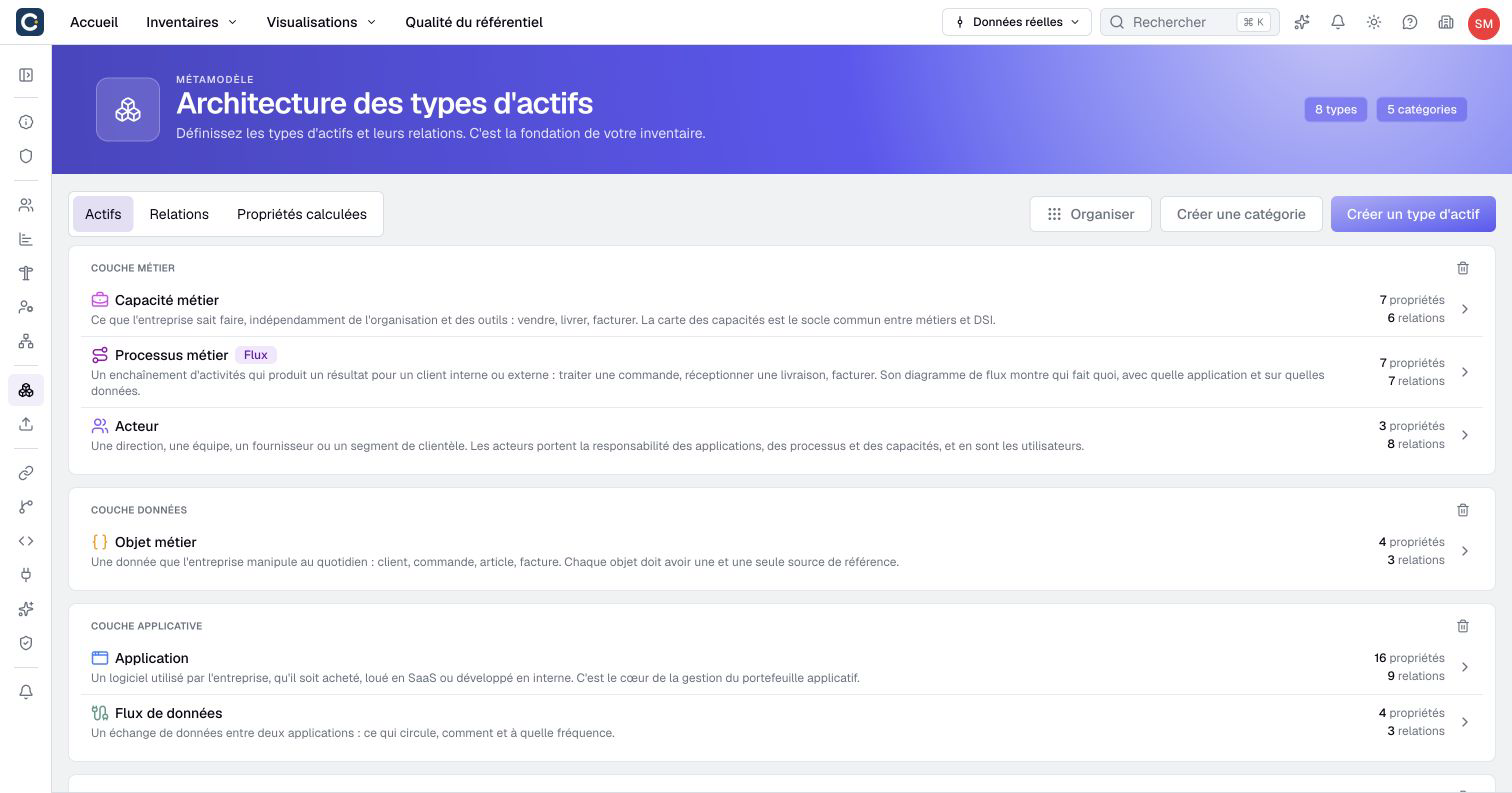
An asset type describes a family of objects, such as Application or Team. An asset is one actual member of that family: your customer portal is an Application. Creating a type does not create an asset of that type.
A property describes information to collect, such as annual cost or lifecycle status. Its configuration sets the input type, available choices and other options. The value is the information recorded for one asset: a cost of 12,000 or a status of Production.
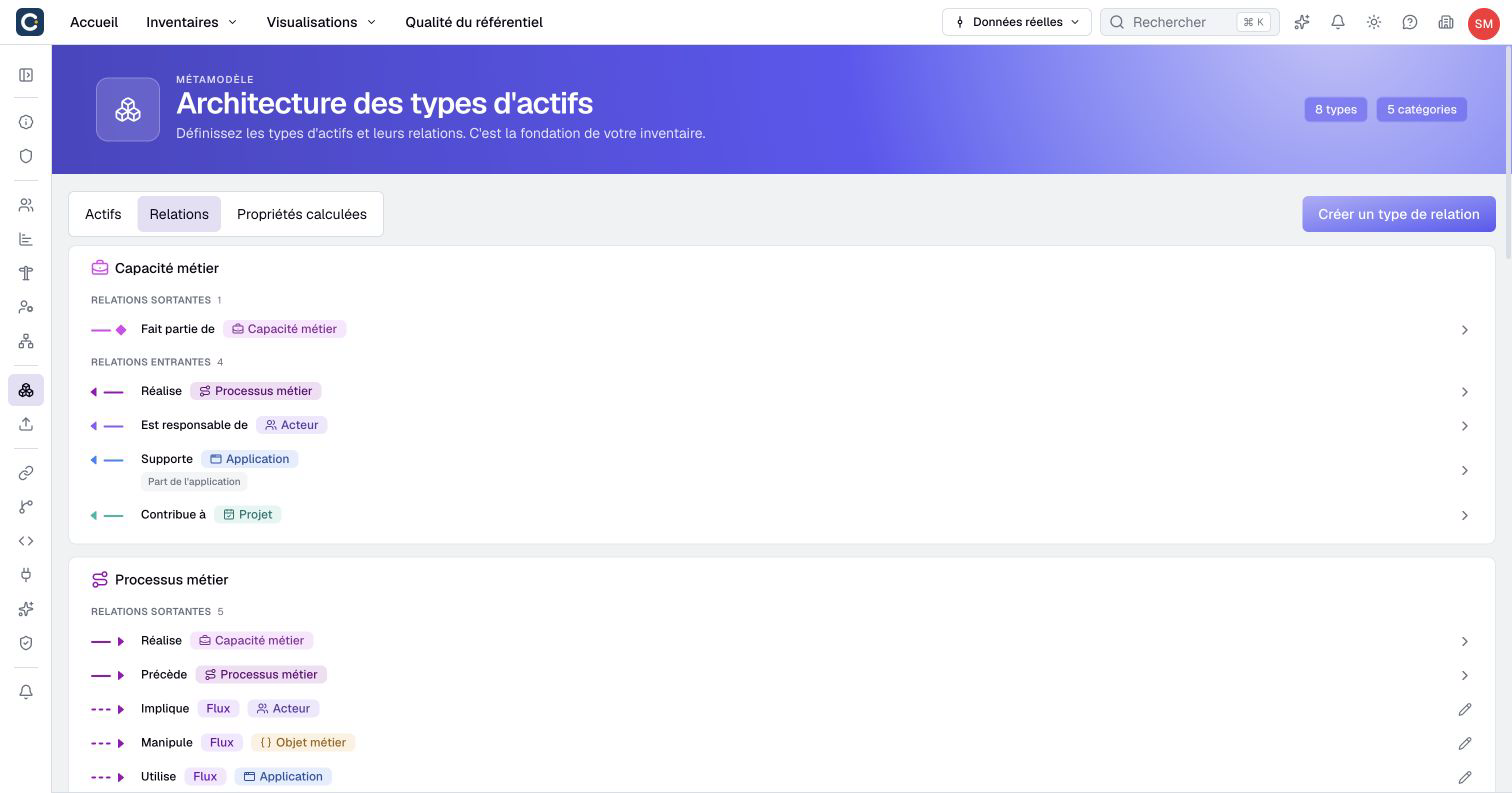
A relationship type describes how assets can be connected, with a source type and a target type. A relationship connects two actual assets. For example, an Application may be maintained by a Team. Information about that connection, such as an allocation percentage, belongs on the relationship when relationship properties are enabled.
Avoid duplicating information that already has a structured home. If a Team is an asset, connect the Application to it instead of maintaining an unrelated text field containing the team's name. The connection can then support navigation and analysis.
Build a first example
Suppose you want to compare application costs and identify responsible teams. Start from the questions the repository must answer, then choose the definitions needed to answer them.
| Definition | Example | What it describes |
|---|---|---|
| Asset type | Application | The family containing the customer portal |
| Property | Annual cost, Currency | A cost recorded for each application |
| Property | Lifecycle, List | One choice from agreed lifecycle stages |
| Asset type | Team | The teams maintaining applications |
| Relationship type | Application → Team | Which team maintains an application |
| Relationship property | Allocation, Percentage | Information specific to one connection |
Open Assets to inspect the existing types before creating another. Select a type's row to inspect its Properties and Relationships. The metamodel's Relationships tab lists connections; each ordinary relationship opens its own configuration page. Computed properties brings together formulas and their dependencies.
Use asset types to create the families, then properties for the information to collect. Configure relationship types before creating business connections. Finally, create a small set of representative assets and inspect their pages and a visualization.
The default model may use English names. Your organization can rename these labels. Choose names that your contributors recognize, and use descriptions to explain what belongs in each type or property.
Organization and permissions
Categories organize asset types in the metamodel. Property categories organize fields within a type. They help people find definitions and read asset pages; they do not grant permissions or make the fields of a category share a value.
Access domains serve a different purpose: they help control who can access data and shared content. Renaming a category or moving a property into a category does not replace configuring rights.
Metamodel administration is also distinct from editing business data. An Editor may update assets without being able to change their definitions. An Administrator managing definitions may still lack permission to read particular business values.
Names and keys
A name is the label people see. A key is a stable identifier used by formulas, imports or integrations. For example, Annual cost can have the key annual_cost.
Creation forms can generate a key from the name. Check it before saving: it must start with a lowercase letter and use lowercase letters, digits and single underscores between segments. Spaces, accented characters and trailing underscores are not accepted.
Existing keys are locked in editing forms until you deliberately unlock them. Prefer changing the name when only the displayed wording needs to change. If the key must change, review the warning and identify formulas, import templates and external integrations using the old key.
Boldo updates affected internal references where supported. This does not update files or external programs maintained outside Boldo. Check those dependencies explicitly after a key change.
Change an existing model
The metamodel applies to the organization. A scenario does not provide a private copy for experimenting with these definitions. Model changes can affect existing scenario operations as well as real data.
To prepare a change:
- Open the type in Organization settings > Metamodel and identify the definition to change.
- Distinguish a label or presentation change from a key change, conversion or deletion.
- Find representative active and archived assets that use it, along with dependent calculations and visualizations.
- Identify existing scenarios, imports and integrations that rely on its current key or type.
- Choose the relevant editing or conversion procedure and review the displayed consequences before confirming.
- After saving, inspect representative assets, calculations and visualizations, then update external dependencies as needed.
Use the dedicated conversion procedure when changing a property's type. A default value applies to creation; changing it does not fill every existing asset. Changing a validation constraint is not a general cleanup of previously stored values.
Deleting a type or property removes associated data. It is not the same as archiving an asset. Dependent calculations can block the operation; update those formulas first. Read any scenario-impact warning before confirming.
Internal references may be adapted or removed according to the change. A successful save alone does not establish that every external dependency still uses the right keys or value formats.