Attest that an asset is up to date
Attesting records that you have checked the asset's information. It does not correct fields, fill missing properties or validate another person's pending suggestion.
You must own the non-archived asset, be able to read it and work in real data with the quality program enabled. A Viewer who owns the asset can attest it. An administrator who does not own it cannot attest on its owners' behalf.
Attest from an inventory
- Open the asset and review the properties, relationships and recent changes relevant to its business use.
- Correct inaccurate information and save the corrections, or have them reviewed if you can only suggest changes.
- Return to its inventory row and open Actions.
- Select Attest up to date once the information is verified.
- Check the success message, then reopen Information → System.
- Verify the attestation date and author, and the freshness state.
The inventory action applies directly; it does not ask you to confirm in another dialog. Do not select it merely to inspect what it does.
When Attest up to date appears inside an edit form, it also takes effect immediately. Cancelling that form afterwards does not cancel the attestation.
An owner can attest an asset whose type has no revalidation delay. That attestation does not expire: the asset stays Attested until someone requests a re-attestation. Administrators configure delays separately.
Use the guided review
From Home → To do, open To attest and select Review all. This queue contains assets you own, of any type, that have never been attested or need another attestation.
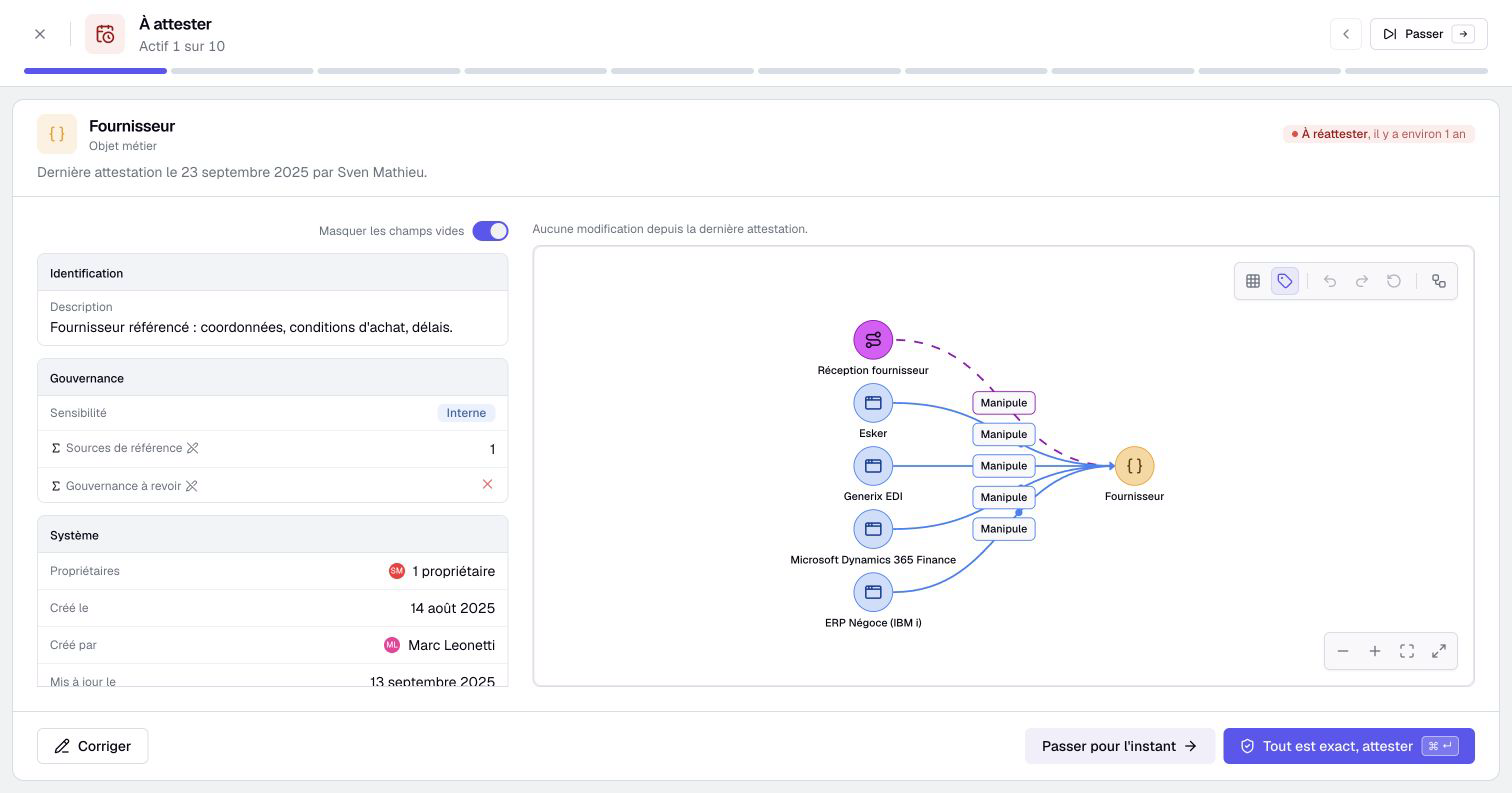
- Read the asset page and any reason given for re-attestation.
- Inspect the displayed changes since the previous attestation.
- Select Attest if the information is correct.
- Otherwise, select Correct or Suggest a correction, according to your access.
- Save direct corrections with Save and attest, or send suggestions with Send suggestions when review by someone else is required.
- Check the result and choose Next asset, or Skip for now if the review is incomplete.
Sending suggestions does not attest the asset. Their acceptance remains a separate step. A mixed correction containing suggested values must not be treated as a fully corrected, attested asset.
The displayed change history can be limited. It supports your review but does not guarantee that every change since the last attestation is shown. Check the current content itself.
Understand the recorded result
Attestation records its date and author. It clears any current re-attestation request and updates freshness. The earlier request remains in the activity history when that feature is available.
It does not update the content's last-modified date. Editing a property does not, by itself, renew the attestation either. These are separate events.
If you discover a problem after attesting, request another attestation. This records a new need for review; it does not pretend the previous attestation never happened.
Review a selected group
The inventory's Select multiple assets mode can offer Attest up to date for a selection. Only eligible visible assets that you own are processed; read the result for processed and skipped items.
Use this after reviewing each selected asset, not as a way to clear an indicator. The bulk attestation action is unavailable for archived assets or a scenario context.
If the action is absent, check ownership, read access, real data context and program activation. Editing rights alone do not make you an owner.