Build precise filters you can read back
Finding applications in production is straightforward. Finding those connected to a production server through a relationship with an allocation above 50% takes more precise criteria. Boldo’s updated filters let you express that distinction and read back the result as a sentence.
Read the question you built
Add conditions and combine them with AND or OR. The summary turns the filter into a readable sentence, so you can check its meaning before applying it. Groups keep combinations such as “Production AND (Critical OR Important)” explicit.
The available operators follow the selected field. You can test several values together where supported, or check whether information is missing. For multiple-choice properties, matching any selected value differs from requiring all of them.
Follow the right relationship
The field picker brings together asset properties, relationships, and the properties of related assets. Within a relationship condition, refine both the link and the asset it reaches.
For the server example, keep “server in production” and “allocation above 50%” inside the same relationship condition. The same link must satisfy both criteria. Two separate relationship conditions can instead be satisfied by two different links.
Relationship inventories distinguish source, target, and relationship properties. You can therefore select exchanges between particular applications while filtering on a protocol or value carried by the link itself.
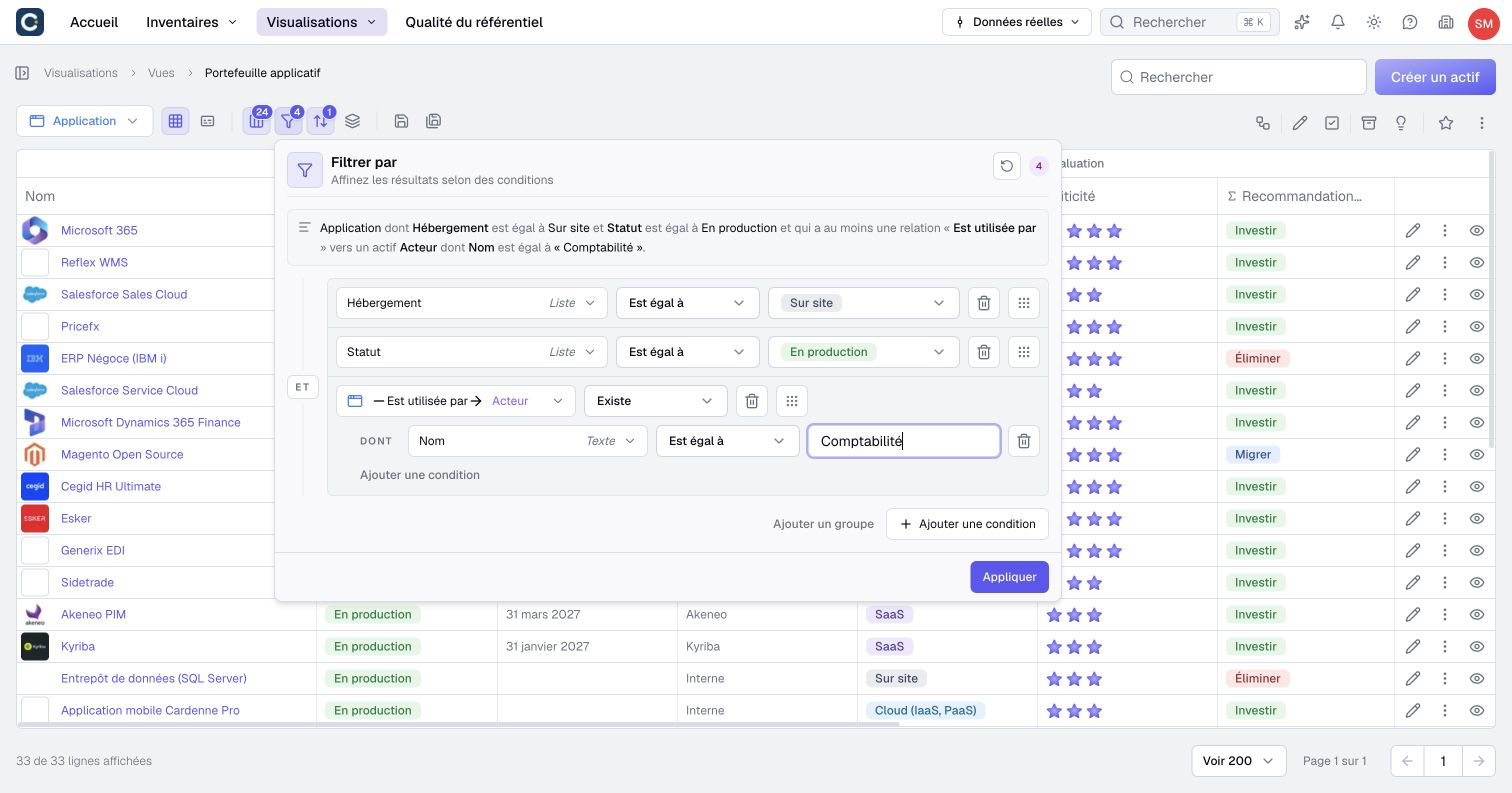
Open Filter by in an inventory or visualization to try the updated editor. The filter documentation explains groups, missing values, and conditions that must match the same relationship.