Contribute to your knowledge base with suggestions
You notice an incorrect application status, but you cannot edit the application. With suggestions in Boldo, you can suggest a correction and send it for review. The repository changes only when someone with the required rights applies the suggestion.
Turn a correction into a suggestion
Choose Suggest in the asset's header to suggest a property value or a relationship. If you have editing rights, open Edit and switch to suggesting changes. Add a note to explain your correction.
You can also suggest changes to an asset’s name, icon, access domains, or owners. Removing a relationship and correcting its properties are available from the relevant context. Each suggestion records its author, date, and status so you can follow its progress.
For the incorrect application status, suggest the expected value and explain what changed. The suggestion records the previous value alongside the suggested value.
Suggest a missing asset or an archive
With read access to an asset type, Suggest an asset lets you describe a missing asset and its relationships. If you can create directly, enable Suggestion in the creation form. Find it under See suggestions > Creations, where its author or an authorized creator can correct it. Create adds the asset and accepts eligible links; other links remain pending.
If an existing asset should leave the active inventory and you cannot archive it directly, use Suggest archiving. It stays active during review. The form’s archive action also suggests when Suggestion is enabled. Find these requests under See suggestions > Archiving. Acceptance archives the asset, deactivates its relationships and rejects its other pending suggestions.
The page Suggest an asset for creation covers submission, review and withdrawal.
Suggest the same change on several assets
Select assets in the inventory to submit a shared correction in one operation. A Viewer sends suggestions; an Editor can choose Suggest instead of apply to request a review.
Check the groups of assets to change directly, submit for review or leave unchanged before submitting. A collective operation can mix direct changes and suggestions according to permissions. Its result lets you inspect what was sent and what was skipped.
Review the difference before deciding
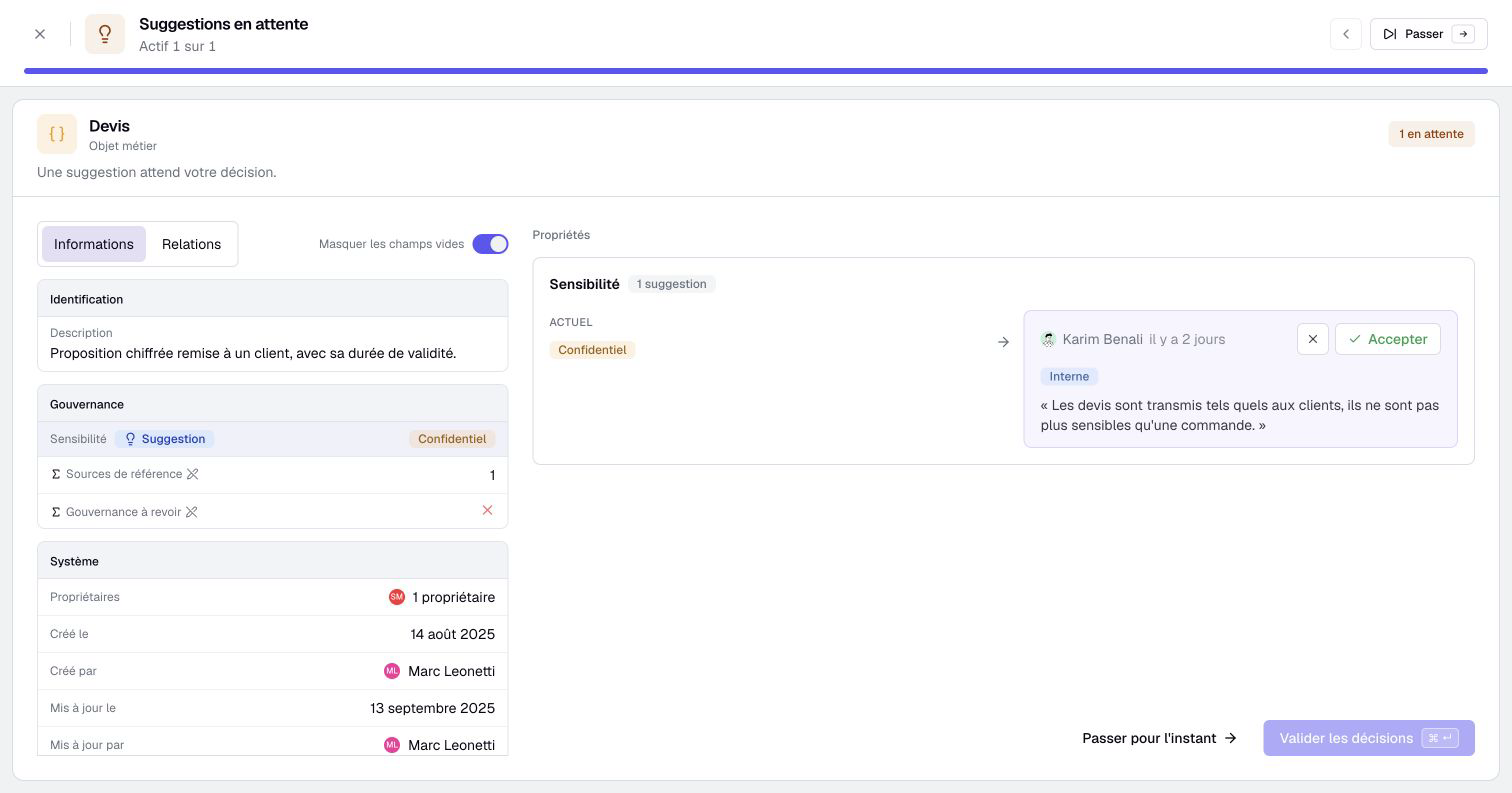
An authorized editor can examine pending suggestions in the asset’s Suggestions tab or among the tasks offered on Home. Review the suggested value and its context, then apply or decline it. Reviewers can explain why they declined a suggestion. Resolved suggestions record who made the decision.
With or without quality tracking, Home lists suggestions on assets you own and creation suggestions naming you as an owner. Suggestions you cannot process remain visible, with the review action disabled. Creation suggestions still require the corresponding creation permissions.
Being responsible for an asset does not automatically grant approval rights. Applying a suggestion requires permission to make the underlying change.
If someone changed the current value after the suggestion was created, Boldo flags a conflict. Review the latest information before deciding which value to keep.
Review several suggestions together
Compare the current value with competing suggestions grouped by property. Choosing one suggestion prepares the rejection of its alternatives. When accepting suggestions in bulk, competing suggestions remain for you to decide between.
You can apply several decisions in one action, then inspect any suggestions that could not be applied.
Notifications help participants follow suggestions and decisions. Authors can withdraw a pending suggestion when it is no longer relevant.
The suggestions guide explains suggestion types, review permissions, and conflict handling.