Asset types
An asset type is a category grouping assets of the same nature. All assets of the same type share the same properties and relationship possibilities.
Access
- Go to Organization → Metamodel
- Select the "Assets" tab
Create an asset type
- Click "Create asset type"
- Fill in Name, Key, Description, Icon, and Color
- Click "Create"
The key is a unique technical identifier used in URLs, API integrations, and external references. It can be changed later, but doing so may break existing integrations.
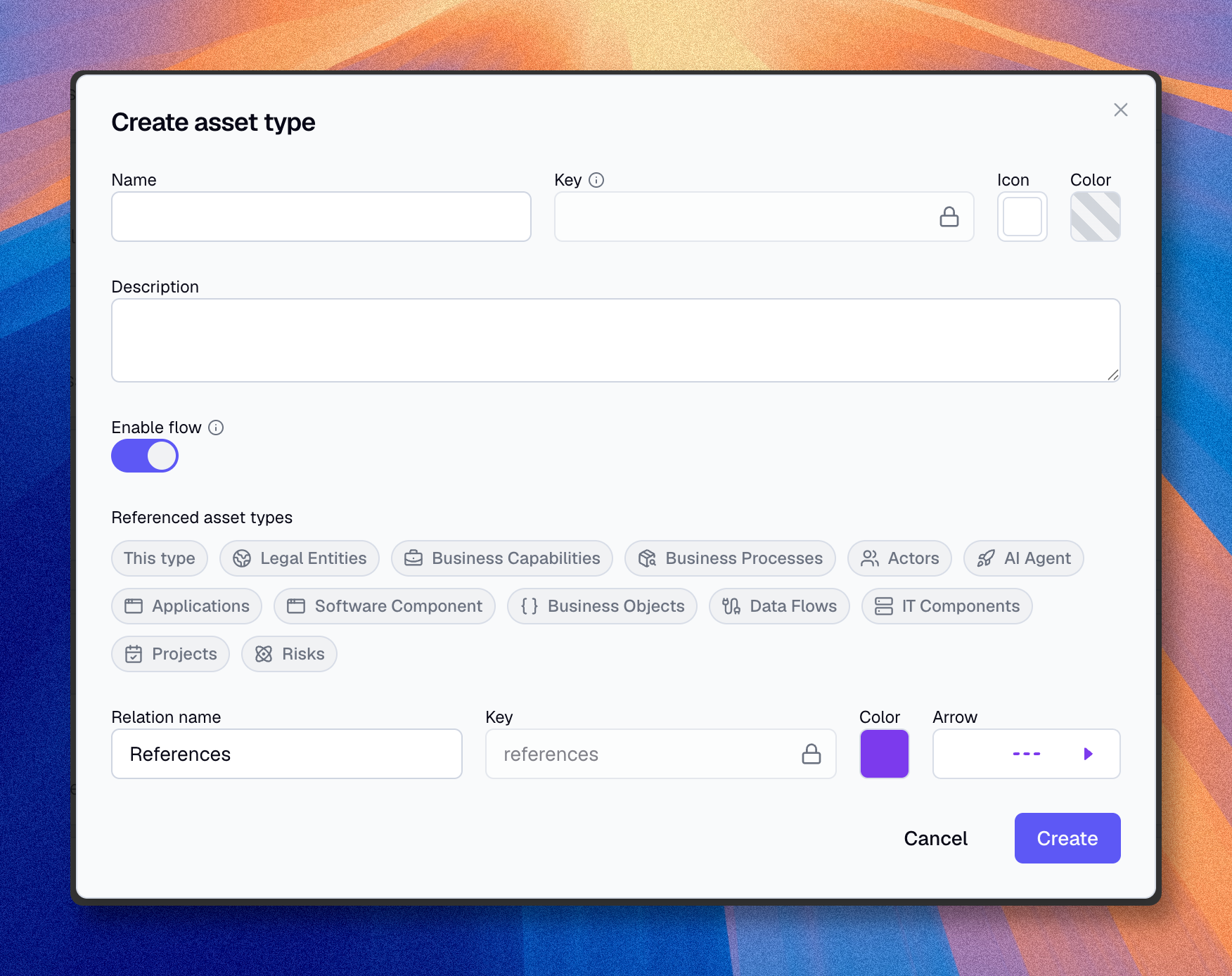
The type is created. Note that every asset automatically has a Name field. You will then add Properties and Relationships to define the rest of its structure.
Modify an asset type
- Click the edit icon of the type
- Modify desired attributes
- Click "Validate"
Modifications are applied immediately. Existing assets reflect the changes.
Changing the name doesn't affect data. Assets keep their properties.
Delete an asset type
Deleting a type permanently deletes all active and archived assets of this type and their data. The archived assets cannot be restored afterward.
- Click the edit icon of the type
- Click the delete icon
- Enter the type name to confirm
- Click "Confirm"
Pre-deletion checks
Before deleting, verify:
- How many assets will be deleted
- Whether other metamodel elements depend on this type
Categories
Admins can group asset types into named categories on the Assets tab of the metamodel page.
You can create, rename, reorder, and delete categories. You assign an asset type to a category by dragging it into that category. Deleting a category does not delete its asset types: they become uncategorized.
Enable flow
Admins can enable the Flow option on an asset type. This allows process flow modeling within assets of that type.
This is only the configuration step. Users do not model the flow on the asset type itself. They first create an asset of that type, then open its Asset 360 page and use the Flow editor tab there.
When enabled, you configure:
- Referenced asset types -- which other asset types can be mentioned in flow steps, including the current asset type itself.
- Relationship style -- the name, color, and arrow style used for the flow relationship. This controls how references appear in diagrams and in the relationship list. The default name is "References".
Flow access rights can then be configured separately per role and access domain. Users also need the matching asset rights to view or edit the asset that carries the flow. See Understand the access model for rights details and Process flows for the modeling workflow.
Disabling flow permanently deletes all existing flows for that asset type.
Recommended asset types
To get started, here are common enterprise architecture types:
| Layer | Suggested types |
|---|---|
| Business | Capabilities, Processes, Actors, Products |
| Functional | Applications, Services, Data objects |
| Technical | Infrastructure components, Servers, Databases |
| Organizational | Teams, Departments, Vendors |
Best practices
- Start with 3-5 types: Add more as needed
- Document each type: Description helps users
- Choose distinctive colors: Facilitates diagram reading
- Avoid duplicates: A "Server" and a "Machine" create confusion